The list of all PHP and Mysql posts

Showing posts with label anti-hack process. Show all posts

how to add newtopic ability to a forum

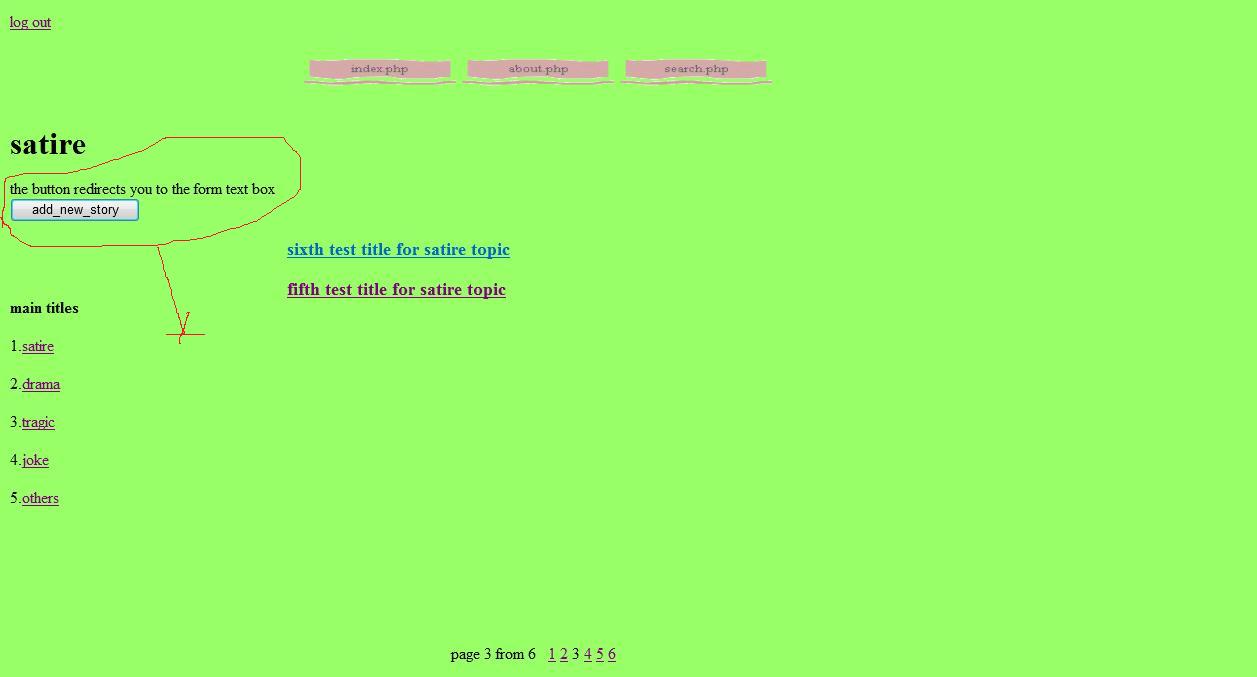
Look at this forum page :


When user clicks on "add_new_story" button (or any other names such as , new topic , new post) , he is directed to "newtopic.php" page , this page is a form that user can enter his post in it , ( a hidden variable is also sent to this page to inform it that the user is directed from which forum ), as you can see in the image below the new-topic page contains : a drop-off menu to choose the post issue (field) , a text field for Title , a text field for post body , a verification code field and a submit button.


Put the following codes in "newtopic.php" file .

code:

<?php
include "auth.inc"; // we check that if user has loged in or not

include ("funcs.php"); // the functions look like : connect (to connect to the database) and creatcode (for verification text) can be put in a file and then we include that file wherever it is required.

?>
<a href="logout.php">log out</a>
<br>

// the following html codes show a menu-bar on the page . they have been created by Frontpage . You can omit them.

<html dir="ltr">
<head>
<meta http-equiv="Content-Type" content="text/html; charset=windows-1252">
<title>new story </title>
</head>
<body bgcolor="#99FF66" >
<table border="0" cellpadding="0" cellspacing="0" width="1055" height="625">
 <!-- MSTableType="layout" -->
 <tr>
  <td valign="top" colspan="3" height="148">
  <!-- MSCellType="ContentHead" -->
  <p align="center">
&nbsp;
<br>
<!--webbot bot="Navigation" S-Type="sequence" S-Orientation="horizontal" S-Rendering="graphics" S-Theme="poetic 0000" B-Include-Home="FALSE" B-Include-Up="FALSE" U-Page="sid:1001" --><a href="index.php"><img src="_derived/index.php_cmp_poetic000_hbtn.gif" width="154" height="37" border="0" alt="index.php" align="middle"></a> <a href="about.php"><img src="_derived/about.php_cmp_poetic000_hbtn.gif" width="154" height="37" border="0" alt="about.php" align="middle"></a> <a href="search.php"><img src="_derived/search.php_cmp_poetic000_hbtn.gif" width="154" height="37" border="0" alt="search.php" align="middle"></a><!--webbot bot="Navigation" i-checksum="38819" endspan --><br>
&nbsp;</p>
  <p><font size="6"><b>new story </b></font></td>
 </tr>
 <tr>
  <td valign="top" width="161">
  <!-- MSCellType="NavBody" -->
  &nbsp;</td>
  <td valign="top" width="747">
  <!-- MSCellType="ContentBody" -->
  <p align="justify"><b><font size="4">
<?php

// when the user clicks on the submit button (on the page) , the form information is sent to an other php page to process , for example "topic_preview.php" , there , base on the entered data two sessions ($_SESSION["sec_code_err_2"] , $_SESSION["fill_all_of_fields"] ) are used to inform incorrect entered code or format.

// if the security code is entered incorrect $_SESSION["sec_code_err_2"] is set to 1 and the browser is redirected to "newtopic.php" again.

// if one of the text fields is empty, $_SESSION["fill_all_of_fields"] is set to 1 and the browser is redirected to "newtopic.php" again.

if($_SESSION["sec_code_err_2"] == 1){
 echo "please enter the code correctly";
 $_SESSION["sec_code_err_2"] = 0;

}

if($_SESSION["fill_all_of_fields"] == 1){
 echo "please fill all of the fields";
 $_SESSION["fill_all_of_fields"] = 0;

}

create_code(); // please see "the verification code  post" on the weblog

?>
<br>
PLease enter title contains only numbers, Capital and Small letters and space
<br>
<br>

// this form information is sent to an other php page to process , for example "topic_preview.php"

<FORM ACTION="topic_preview.php" METHOD=POST>

<?php

// A drop-off menu to assign the post field , the default value has been sent from the forum page ("showforum.php") by a hidden variable to inform the forum issue.

$options = array("satire" => "SATIRE","drama" => "DRAMA","tragic" => "TRAGIC"
,"joke" => "JOKE","others" => "OTHERS");

$default= $_POST["originforum"];
$html = generate_menu("field",$options,$default);
echo $html;
?>
<BR>
<BR>
Title:
<INPUT TYPE="TEXT" NAME="title" SIZE="100"  >
<BR>
<BR>
post body:
<BR>
<textarea name="body" ROWS=40 COLS=100 ></textarea>
<BR>
<BR>
<BR>
<INPUT TYPE="TEXT" NAME="SecCode2" SIZE="30"  >
<BR>
<img src="security_image.php">
<BR>
<BR>
<BR>
<INPUT TYPE="SUBMIT" NAME="BUTTON2" VALUE="new_topic">
</FORM>
</td>
  <td valign="top" height="427" width="147">
  <!-- MSCellType="NavBody2" -->
  &nbsp;</td>
 </tr>
 <tr>
  <td valign="top" colspan="3" height="50">
  <!-- MSCellType="ContentFoot" -->
  &nbsp;</td>
 </tr>
</table>
</body>
</html>
<p>
<br>
</p>
<html dir="ltr">

when the user clicks on the submit button (on the page) , the form information is sent to an other php page to process , for example "topic_preview.php" , there the enteries are processed and if there is any problem such as , wrong verification code , empty text field and wrong format for enteries , the user is redirected to "newtopic.php" to correct his enteries and the appropriate message is shown related to the problem . If there isn't any problem then the enteries will be recorded in the database and the browser will be directed to the forum that the user had begun from it (the forum that the user wanted to submit a new post to it).
In the following you can see the codes of "topic_preview.php" page :

code:

<?php
include "auth.inc";
include "funcs.php";
session_start();

// some processes over security code .

$UserSecCode = strtolower($_POST["SecCode2"]);
$SysSecCopde = strtolower($_SESSION["SecImageStr"]);
if($UserSecCode != $SysSecCopde){

// check if the security code has been entered correctly

 $_SESSION["sec_code_err_2"] = 1;
 header("Location: newtopic.php");
 exit;
}

if( (($_POST["title"])=="")  or (($_POST["body"])=="") )

// check if there is any of the text fields empty

{
 $_SESSION["fill_all_of_fields"] = 1;
 header("Location: newtopic.php");
 exit;
}else{

// deactivate the error sessions because now there is no problem

$_SESSION["sec_code_err_2"] = 0;
$_SESSION["fill_all_of_fields"] = 0;

// the author's username of the post is one of the things that should be recorded to the database:

$user = $_SESSION["auth_usr"];

// some prosses over the entered title

$title = $_POST["title"];
$user = trim($user); // trim omits "space" characters from two sides of a text
$title = trim($title);

$user = htmlspecialchars($user); // change html characters in to regular text , this is an anti-hack process

$title = htmlspecialchars($title);
if(ereg("[^a-zA-z0-9\ ]",$title))
{

// here we chek the title format that it should contain only numbers and letters , I haven't defined any session for it to show a message , you can do it by yourselves. Anyway , the user is redirected to "newtopic.php" if the format isn't correct.

 header("Location: newtopic.php");
 exit;

}

// omit the dangerous characters from the enteries , these are far too much process on the data , I just wanted to show you  a bunch of these processes.

$user = str_replace("'", "", $user);
$title = str_replace("'", "", $title);

$user = str_replace("\\", "", $user);
$title = str_replace("\\", "", $title);

$post_folder = ($user . $title .md5(rand(0,9999))); // this line is not needed , in the previous version of my codes , I wanted to work with files , but i have changed my codes and this guy has remained from then.

// the post body should be recorded in to the database.

$data = $_POST["body"];

// post field (the entery from the drop-off menu) shows that the post belongs to which forum.

$path = $_POST['field'];
connect_2();

// the date is an other thing that should be recorded in to the database.

$Today = date("Ymd");

// This is the most important thing :  For each new post we produce a "$link" variable , this variable is unique for each post it is a combination of the date ($Today) , author name ($user) , the post title ($title) and a random created string( md5(rand(0,9999)) ). This link ($link) is recoreded in to the database and it's also used in the hyperlink to the post on the forum.

$link = ($Today . $user . $title .md5(rand(0,9999)));

// the post information are recorded to the database , the following query is used to record . the variable "numreply" (that is zero by default) , shows the number of replies that is submitted to the post.

$sql = "INSERT INTO topics (author,field,date,title,foldername,link,numreply,text) VALUES ('$user','$path','$Today','$title','$post_folder','$link','0','$data')";
mysql_query($sql);

// After the post was recorded to the database , it's time to direct the user to the forum. we direct the user to "showforum.php" and we also send the variable "link" , to inform the field of the forum to be shown.

$dd = "showforum.php?link=". $_POST['field'];
header("Location: $dd");
exit;
}
?>

As I told in the comments of the codes , For each new post we produce a "$link" variable , this variable is unique for each post , it is a combination of the date ($Today) , author name ($user) , the post title ($title) and a random created string( md5(rand(0,9999)) ). This link ($link) is recoreded in to the database and it's also used in the hyperlink to the post on the forum.

Now to produce a hyperlink to a certain post , we can use the following codes. (these codes are belong to "showforum.php" ) . you can see :
http://webprogram4beginners.blogspot.com/2011/04/how-to-show-posts-inside-of-forum.html


Codes:

connect();

$sql = "SELECT * FROM topics WHERE field='$forumlink' "; // we extarct the post under a certain forum issue (field)

$SearchResult = mysql_query($sql);

$TotalResults = mysql_num_rows($SearchResult);

$TextTitle = mysql_result($SearchResult, $i, 3); // for all search results we put the post title in "$TextTitle" .($i is a counter , it means the i-th result)

$Textauthor = mysql_result($SearchResult, $i, 0); // for all search results we put the post author in "$Textauthor" .

$Textlink = mysql_result($SearchResult, $i, 5); // for all search results we put the post link (the variable we discussed about in the above) in "$Textlink".

echo "<a href=\"showtopic.php?Textlink=" .$Textlink. " \">" . $TextTitle . "</a>"; // now we  produce a hyperlink that the "link" (Textlink) is its variable. The page "showtopic.php" will show the appropriate post base on the variable.

You may need to read the following posts to understand the current post better :

http://webprogram4beginners.blogspot.com/2011/04/how-to-make-drop-off-menu.html

http://webprogram4beginners.blogspot.com/2011/02/how-to-make-verification-text-field.html

http://webprogram4beginners.blogspot.com/2011/02/php-orders-to-work-with-database-and.html

http://webprogram4beginners.blogspot.com/2011/02/how-to-add-variable-to-url-adress.html

How to make a login page

Please , look at the following post that is about directing a user to login page from a requested page:

http://webprogram4beginners.blogspot.com/2011/02/redirect-user-to-login-page-sessions.html

If the user click on any link in our website he is directed to login page to login first and after it he is redirected to his requested page.
Copy these codes for "login.php" page.

code:

<?php
session_start();
include ("funcs.php"); // the functions look like connect (to connect to the database) and creatcode (for verification text) can be put in a file and then we included that file wherever it is required.

if(!$_POST["usr"] or !$_POST["pasw"]){
// if the username or password field is empty the appropriate message is shown.

 echo "you must enter user and password <br>";
}

else{

// these are some processes that you can do over the enteries to prevent from database injection (hacking)

$entered_usr=$_POST["usr"];
$entered_pass=$_POST["pasw"];

$entered_usr=trim($entered_usr); // omit the space characters from the begin and end of the word
$entered_pass=trim($entered_pass);

$entered_usr = htmlspecialchars($entered_usr); // change any code in to non-html characters (hackers may enter html characters in to your system)

$entered_pass = htmlspecialchars($entered_pass);

$entered_usr = str_replace("'", "", $entered_usr);
$entered_pass = str_replace("'", "", $entered_pass);

$entered_usr = str_replace("\\", "", $entered_usr);
$entered_pass = str_replace("\\", "", $entered_pass);

connect(); 

// first , connect the stream to the database and find the password related to the entered username and compare it to the entered password.

$sql = "SELECT * FROM users WHERE username='$entered_usr' ";
$search_result = mysql_query($sql);
$password = mysql_result($search_result,0,1);
}

$salt = substr($password,0,2); // finding $salt (the cryption code) by choosing the first two characters of the password from database

if((!ereg("[^a-zA-z0-9\ ]",$entered_usr))  and  (crypt($entered_pass,$salt) == $password)){

// here we compare the password over the database with the encrypted version  of the entered password. if it is correct the user is redirected to his requested page and the authority session ($_SESSION["auth_usr"]) is set.

 $_SESSION["auth_usr"]=$entered_usr;
 $dd = $_SESSION["d"];
 header("Location: $dd");
 exit;
}
else{

// if the entered password (after encryption ) is not equal to the password over the database , the appropriate message is shown.

 echo "incorrect user or password";
}
?>
<BR>
<BR>
<FORM ACTION="login.php" METHOD=POST>
user NAME:
<INPUT TYPE="TEXT" NAME="usr" SIZE="30" >
<BR>
password:
<INPUT TYPE="PASSWORD" NAME="pasw" SIZE="30" >
<BR>
<BR>
<INPUT TYPE="SUBMIT" NAME="BUTTON1" VALUE="loginn">
</FORM>
<BR>
<BR>
<?php

// if the user has not registered yet he can go for registeration to the signup page by the following link.

echo "<p><a href=\"signup.php\">if you haven't user please sign up</a></p>";
?>

For logout just remove all of the session elements . To make logout link you can put the following link for logout to be shown over all of your pages :

code:

<a href="logout.php">log out</a>

And put these codes in "logout.php" page.


code:

<?php
session_start();
$_SESSION = array(); // remove all of the session elements.
header("Location: index.php"); // direct the stream to the first page of your website.
exit;
?>

If you couldn't find out about the codes here go the following posts to read more about the orders I have used here:

http://webprogram4beginners.blogspot.com/2011/02/redirect-user-to-login-page-sessions.html
http://webprogram4beginners.blogspot.com/2011/02/php-orders-to-work-with-database-and.html

Just one more case about crypt function:

The crypted text result = crypt(the text that we want to encrypt,$salt);

This function encrypt words by use of the variable $salt. if you use a two characters salt then the two first characters of the encrypted result always would be your salt.
for example :

code:

$pass = "v1" ;
$salt = "qw";
$result = crypt($pass,$salt);
Then "$result" would be :

$result = "qwbw9k/vI9OlY";

We have used this here  :

$salt = substr($password,0,2);

We don't assign our $salt on the codes above, instead we extract our $salt directly from the encrypted password on the database.

Sign up page

Signup page is the page that users submit their username and passwords , so that they would be registered users and they can login again in the future.

For the appearance of the signup page we need a form with input fields and buttons to input the data:
Make a page with "signup.php" name and enter these simple codes in it , it contains a verification field that you can find out about it in : http://webprogram4beginners.blogspot.com/2011/02/how-to-make-verification-text-field.html

code:

<?php
session_start();
include ("funcs.php");
if($_SESSION["repeated_usr"] == 1){
// to show that the entered username has been selected before by an other user so it's not available to choose.
echo "please choose an other username , this is repeative";
}
if($_SESSION["Security_code_error"] == 1){
// to show that the security code has not been entered correctly
echo "please enter the secuity code correctly";
}
create_code(); // see it in the post about verification field
?>
<br>
PLease enter username and passwords contain only numbers, Capital and Small letters and space
<BR>
<BR>
<FORM ACTION="mysql_1.php" METHOD=POST>
user NAME:
<INPUT TYPE="TEXT" NAME="usr" SIZE="30" >
<BR>
<BR>
password:
<INPUT TYPE="PASSWORD" NAME="pasw" SIZE="30" >
<BR>
<BR>
<INPUT TYPE="TEXT" NAME="SecCode" SIZE="30" >
<BR>
<img src="security_image.php">
<BR>
<BR>
<INPUT TYPE="SUBMIT" NAME="BUTTON2" VALUE="sign up">
</FORM>

When a user click on the submit button he is directed in to "mysql_1.php" page that analyzes the entered username , password and security code.
The Following codes are contents of this page ("mysql_1.php").


code:

<?php
session_start();
$_SESSION["Security_code_error"]=0; // a session element to check the security code (verification text) that should be entered correctly by user
$_SESSION["repeated_usr"] = 0; // a session element to check if the entered username has already been selected by an other user , or not?
include ("funcs.php"); //  functions look like connect (to connect to the database) and creatcode (for verification text) can be put in a file and then we included that file wherever it is required.

if(!$_POST["usr"] or !$_POST["pasw"]){
// if the username or password field is empty the browser is redirected to "signup.php" page.
 header("Location: signup.php");
 exit;
}


$UserSecCode = strtolower($_POST["SecCode"]); // change all of the letters in to lower case
$SysSecCopde = strtolower($_SESSION["SecImageStr"]);

if($UserSecCode != $SysSecCopde){
// if security code is not entered correctly , the browser is redirected to "signup.php" page.
 $_SESSION["Security_code_error"] = 1; // this variable is sent to signup page to show the appropriate message.
 header("Location: signup.php");
 exit;
}


// these are some processes that you can do over the enteries to prevent from database injection (hacking)

$entered_usr=$_POST["usr"];
$entered_pass=$_POST["pasw"];

$entered_usr=trim($entered_usr); // omit the space characters from the begin and end of the word
$entered_pass=trim($entered_pass);

$entered_usr = htmlspecialchars($entered_usr); // change any entery in to non-html characters (hackers may enter html characters in to your system)

$entered_pass = htmlspecialchars($entered_pass);

if(ereg("[^a-zA-z0-9\ ]",$entered_usr)){
// this condition checks the configuration of the entered username. The username should contain only capital and small letters and numbers.

 $_SESSION["repeated_usr"] = 1; // we redirect the user to signup page , but I haven't used any new session element to show this issue.

 header("Location: signup.php");
 exit;

}

// an other series of processes over data to prevent database injection (hacking) , I'm too much cautious , you can omit them.

$entered_usr = str_replace("'", "", $entered_usr);
$entered_pass = str_replace("'", "", $entered_pass);
$entered_usr = str_replace("\\", "", $entered_usr);
$entered_pass = str_replace("\\", "", $entered_pass);


// first we check if the entered username is repeative , or not?
$Sql = "SELECT COUNT(*) FROM  users  WHERE username='$entered_usr' ";
connect();
$Result = mysql_query($Sql) or die(mysql_error() . "<br>SQL: " . $Sql);
if(mysql_result($Result, 0) > 0 ){
 $_SESSION["repeated_usr"] = 1;
 header("Location: signup.php");
 exit;

}else{


// if the entered username has no problem now we can enter username , password and  date in to our database

$Today = date("Ymd");
$salt = "qw";
$entered_pass = crypt($entered_pass,$salt); // we crypt the password not to be recovered easily.

$sql = "INSERT INTO users (username,password,joindate) VALUES ('$entered_usr','$entered_pass','$Today')";
mysql_query($sql);

$_SESSION["auth_usr"]=$entered_usr; // this session shows that the user has been registered and he is now loged in.

$dd = $_SESSION["d"]; // this session element contains the page (address) that the user has been redirected from it.

header("Location: $dd");
exit;
}
?>

If you couldn't understand about the codes here go to the following posts to read more about the orders I have used here:

http://webprogram4beginners.blogspot.com/2011/02/redirect-user-to-login-page-sessions.html

http://webprogram4beginners.blogspot.com/2011/02/php-orders-to-work-with-database-and.html

Just one more case about crypt function:

The crypted text result  =  crypt ( the text that we want to encrypt , $salt );


This function encrypt words by use of the variable $salt. if you use a two characters salt then the two first characters of the encrypted result always would be your salt.
for example :

code:

$pass = "v1" ;
$salt = "qw";
$result = crypt($pass,$salt);
Then "$result" would be :

$result = "qwbw9k/vI9OlY"

As you can see , you can extract $salt from the encrypted data over your database just by selecting the first two characters of $result.